Best IRC Clients for Every Platform in 2025

Complete guide to IRC clients for Windows, macOS, Linux, Android, and iOS. Find the perfect IRC client for your needs with download links and feature comparisons.
📱 Best IRC Clients for Every Platform in 2025
Finding the right IRC client can greatly enhance your chat experience. Whether you're on desktop or mobile, here's our comprehensive guide to the best IRC clients available for macOS, Linux, Windows, Android, and iOS.
📑 Table of Contents
- 🖥️ Cross-Platform Clients
- 🪟 Windows
- 🍎 macOS
- 🐧 Linux
- 📱 Android
- 🍏 iOS
- 🎯 Quick Comparison Table
- 💡 Choosing the Right Client
- 🔗 Additional Resources
- 📊 Platform Summary
🖥️ Cross-Platform Clients
💬 WeeChat
Platforms: Windows, Linux, macOS
A fast, lightweight, and extensible terminal-based IRC client that's perfect for power users. WeeChat is highly customizable and supports 8 scripting languages including Python, Perl, Ruby, Lua, Tcl, Scheme, JavaScript, and PHP.
Features:
- 🎨 Fully customizable interface
- 🔌 Multi-server support
- 🤖 Smart filtering and notification system
- 📜 Extensive plugin ecosystem
- 🌐 Remote interface capability
Download: https://weechat.org
🎯 HexChat
Platforms: Windows, Linux, macOS
Based on XChat, HexChat is a free and open-source client with a clean, tabbed interface. It's one of the most popular IRC clients for Windows and offers excellent multi-server support.
Features:
- 🆓 Completely free (unlike XChat)
- 📑 Multi-channel tabbed interface
- 🔒 SSL/TLS support
- 🎯 Spell checking
- 📝 Logging capabilities
Download: https://hexchat.github.io
🔄 Quassel
Platforms: Windows, Linux, macOS, Android
A modern, distributed IRC client with a unique architecture. Features a "core" component that stays permanently online and "client" applications that connect to this core.
Features:
- ☁️ Bouncer-like functionality built-in
- 💬 Synced chat history across devices
- 🎨 Modern Qt-based interface
- 📱 Mobile client support (Quasseldroid)
Download: https://quassel-irc.org
🦀 Halloy
Platforms: Windows, Linux, macOS
A modern, open-source IRC client written in Rust with the Iced GUI library. Simple, fast, and efficient.
Features:
- 🦀 Built with Rust for performance
- 🎨 Clean, modern interface
- ⚡ Fast and lightweight
- 🔓 Fully open source
Download: https://halloy.squidowl.org
🪟 Windows
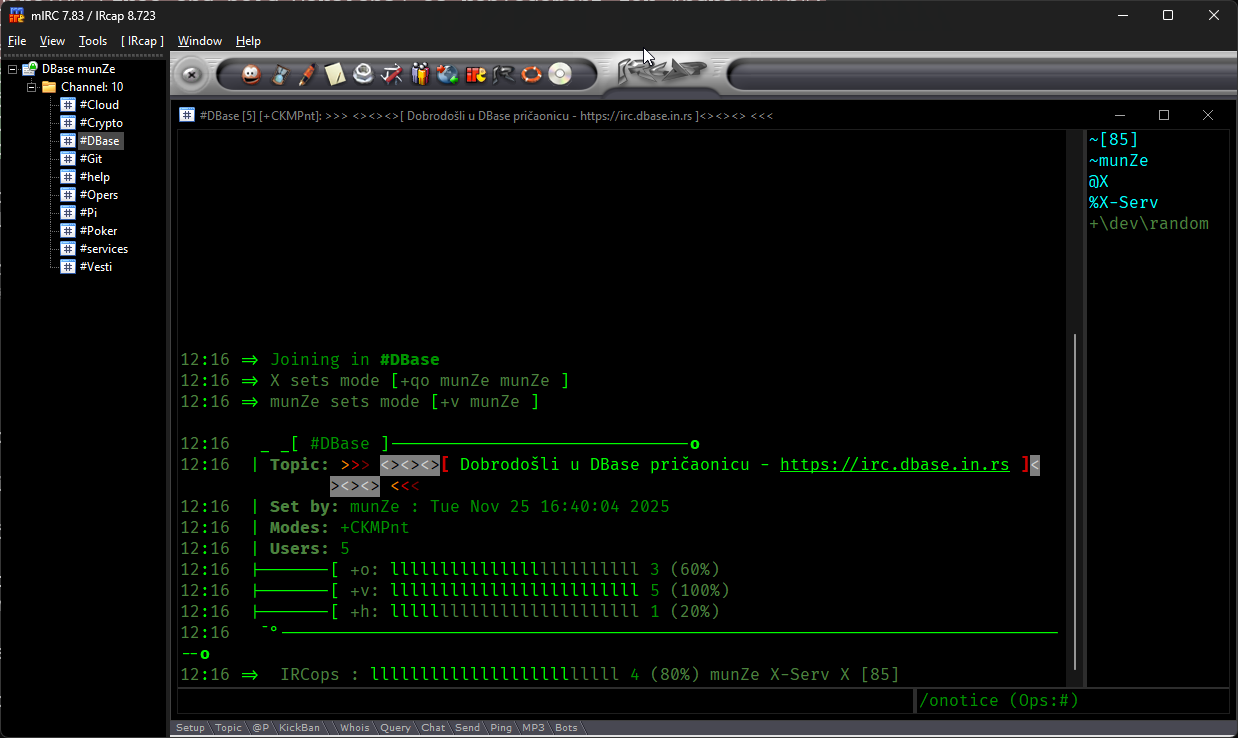
🎮 mIRC
Platform: Windows
The classic IRC client that defined IRC on Windows for decades. While it's shareware ($20 after trial), it remains one of the most feature-rich and stable clients available.
Features:
- 👴 Time-tested and reliable
- 🎨 Highly customizable with scripts
- 📁 Built-in file transfer (DCC)
- 🎵 Media player integration
- 🔧 Extensive scripting language
Download: https://www.mirc.com Price: $20 (30-day free trial)
❄️ IceChat
Platform: Windows
A stable, free IRC client with full Windows 10/11 64-bit support and a traditional tabbed interface.
Features:
- 🆓 Completely free
- 💻 Native 64-bit support
- 📑 Multi-server support
- 🎨 Customizable themes
Download: https://www.icechat.net
🍎 macOS
📝 Textual
Platform: macOS
A beautifully designed IRC client that embraces macOS design principles. Highly customizable with CSS, HTML, JavaScript, and supports plugins.
Features:
- 🎨 Native macOS design
- 🔔 Notification Center integration
- 📱 Retina display optimized
- 🎭 Customizable with CSS/HTML/JS
- 🔌 Plugin support (Objective-C & Swift)
Download: https://www.codeux.com/textual Note: No longer in Mac App Store; available via direct download
🍋 LimeChat
Platform: macOS
An elegant, lightweight IRC client designed specifically for macOS with a focus on simplicity and functionality.
Features:
- 🍋 Clean, minimal interface
- 🆓 Free and open source
- ⚡ Fast and lightweight
- 🎨 macOS-native design
Download: http://limechat.net/mac
🐧 Linux
💻 Irssi
Platform: Linux (also macOS, BSD)
The legendary terminal-based IRC client beloved by system administrators and power users. Extremely lightweight and scriptable.
Features:
- 💻 Terminal-based interface
- 🪶 Minimal resource usage
- 🔧 Highly scriptable (Perl)
- 📜 Excellent logging
- 🎯 Perfect for tmux/screen sessions
Download: https://irssi.org
🔷 Konversation
Platform: Linux (KDE)
The most user-friendly IRC client for KDE desktop environments with excellent integration.
Features:
- 🎨 Beautiful KDE integration
- 🖱️ User-friendly GUI
- 🔔 Desktop notifications
- 📝 Automatic logging
- 🌐 Multi-language support
Download: Available in most Linux distribution repositories
📱 Android
☁️ IRCCloud
Platform: Android, iOS, Web
A cloud-based IRC client that keeps you connected 24/7. Your connections run on IRCCloud's servers, syncing chat history across all devices.
Features:
- ☁️ Always-connected (bouncer included)
- 🔔 Push notifications
- 💬 Full chat history sync
- 🌐 Web, iOS, and Android apps
- 📱 Modern mobile interface
Download: Google Play Store Price: Free tier available, premium features require subscription
🥔 Goguma IRC Client
Platform: Android, Linux
A modern, lightweight, and easy-to-use IRC client optimized for mobile devices. Created by the developer of soju.
Features:
- 🎨 Modern Material Design
- 🪶 Lightweight and fast
- 🔓 Open source
- 📱 Mobile-optimized interface
- 📶 Standard IRC protocol only
Download: Google Play Store Updated: September 2025
🔐 CoreIRC
Platform: Android
A secure IRC client with Material Design featuring IRCv3 support and modern authentication methods.
Features:
- 🔒 SSL/TLS support
- 🎨 Material Design UI
- 🔐 SASL & NickServ authentication
- 📱 IRCv3 compatible
- 🆓 Free version available (CoreIRC Go)
Download: Google Play Store
🤖 Quasseldroid
Platform: Android
The Android companion app for Quassel IRC. Requires a Quassel core to connect to.
Features:
- 🎨 Beautiful Material Design
- 👤 Profile picture support
- 🆓 Completely free and open source
- 🔄 Syncs with Quassel core
Download: Google Play Store Note: Requires Quassel core setup
🍏 iOS
💎 Palaver
Platform: iOS (iPhone, iPad)
The premier IRC client for iOS with a beautiful native interface and excellent feature set. Perfect for iPhone and iPad users.
Features:
- 🎨 Modern iOS design
- 🔔 Push notifications via ZNC
- 🔐 Complete SASL support
- ☁️ iCloud preference sync
- 🎭 Multiple themes available
- 📱 IRCv3 support
Download: App Store Website: https://palaverapp.com
☁️ IRCCloud (iOS)
Platform: iOS, Android, Web
The same great cloud-based IRC experience available on iOS.
Features:
- ☁️ Always-connected via cloud
- 🔔 Push notifications
- 💬 Synced chat history
- 📱 Native iOS interface
Download: App Store Price: Free tier available, premium subscription for unlimited connections
🎯 Quick Comparison Table
| Client | Platform | Price | Best For |
|---|---|---|---|
| WeeChat | Win/Lin/Mac | Free | Power users, scriptability |
| HexChat | Win/Lin/Mac | Free | Beginners, simple interface |
| mIRC | Windows | $20 | Windows veterans, scripting |
| Textual | macOS | Paid | macOS native experience |
| Irssi | Linux/Unix | Free | Terminal enthusiasts |
| IRCCloud | All platforms | Freemium | Always-connected, mobile |
| Palaver | iOS | Paid | iPhone/iPad users |
| Goguma | Android | Free | Modern Android interface |
💡 Choosing the Right Client
For Beginners:
- Windows: HexChat or IceChat
- macOS: LimeChat
- Linux: Konversation or HexChat
- Mobile: IRCCloud or Goguma
For Power Users:
- Desktop: WeeChat or Irssi
- Mobile: IRCCloud (with bouncer)
For 24/7 Connection:
- IRCCloud (built-in bouncer)
- Quassel (self-hosted core)
- Any client + ZNC bouncer
For Mobile-First:
- Android: Goguma or CoreIRC
- iOS: Palaver
🔗 Additional Resources
- Libera Chat Client Guide: https://libera.chat/guides/clients
- IRCHelp.org: https://www.irchelp.org/clients
- Awesome IRC: https://github.com/davisonio/awesome-irc
📊 Platform Summary
| Platform | Recommended Clients |
|---|---|
| 🪟 Windows | HexChat, mIRC, IceChat, WeeChat |
| 🍎 macOS | Textual, LimeChat, WeeChat, HexChat |
| 🐧 Linux | Irssi, WeeChat, Konversation, HexChat |
| 🤖 Android | Goguma, IRCCloud, CoreIRC, Quasseldroid |
| 🍏 iOS | Palaver, IRCCloud |
Last updated: December 2025
Need help getting started with IRC? Check out our beginner's guide or join us on IRCDBase to explore IRC networks and connect with communities worldwide!
Share this post
Found this helpful? Share it with others!